Blog Community Plugin 3.0.0 Released – Multi-Platform Support, Google News RSS & Submission Logging

Version 3.0.0 Released

Blog Community Plugin

Automated blog commenting & community engagement across multiple platforms — now with multi-platform blog types, Google News RSS search and submission logging.

📅 June 5, 2026  ·  SEO Panel Team  ·  3 min read

Get Blog Community Plugin — $25

We are excited to announce the release of Blog Community Plugin 3.0.0 — a major upgrade to our blog commenting and community engagement plugin for SEO Panel. This version delivers multi-platform blog type support, Google News RSS integration, detailed submission logging, a redesigned report dashboard and much smarter comment submission detection.

3,291
Downloads

4 / 5
Rating (256 reviews)

$25
One-time price

What’s New in 3.0.0

01

Multi-Platform Blog Types

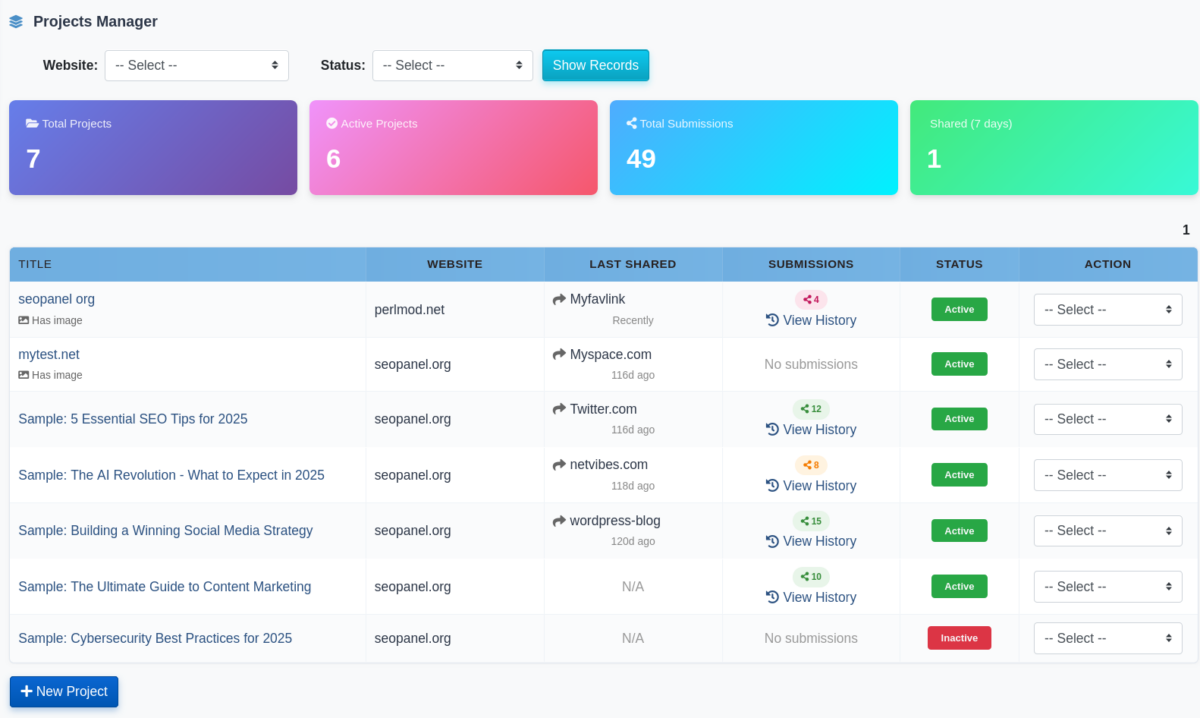
Support for WordPress.com and Hosted WordPress is live now, with Blogger, Tumblr, Reddit, LiveJournal and Medium coming soon. Each platform has its own search engine, regex and comment form configuration, so the plugin adapts to the quirks of each platform automatically.

02

Google News RSS Search

WordPress.com and Hosted WordPress projects now use Google News RSS feeds to discover relevant blog posts. Each project supports per-project language and country localisation, giving you more relevant, keyword-matched results from real news-indexed posts in your target market.

03

Submission Logging

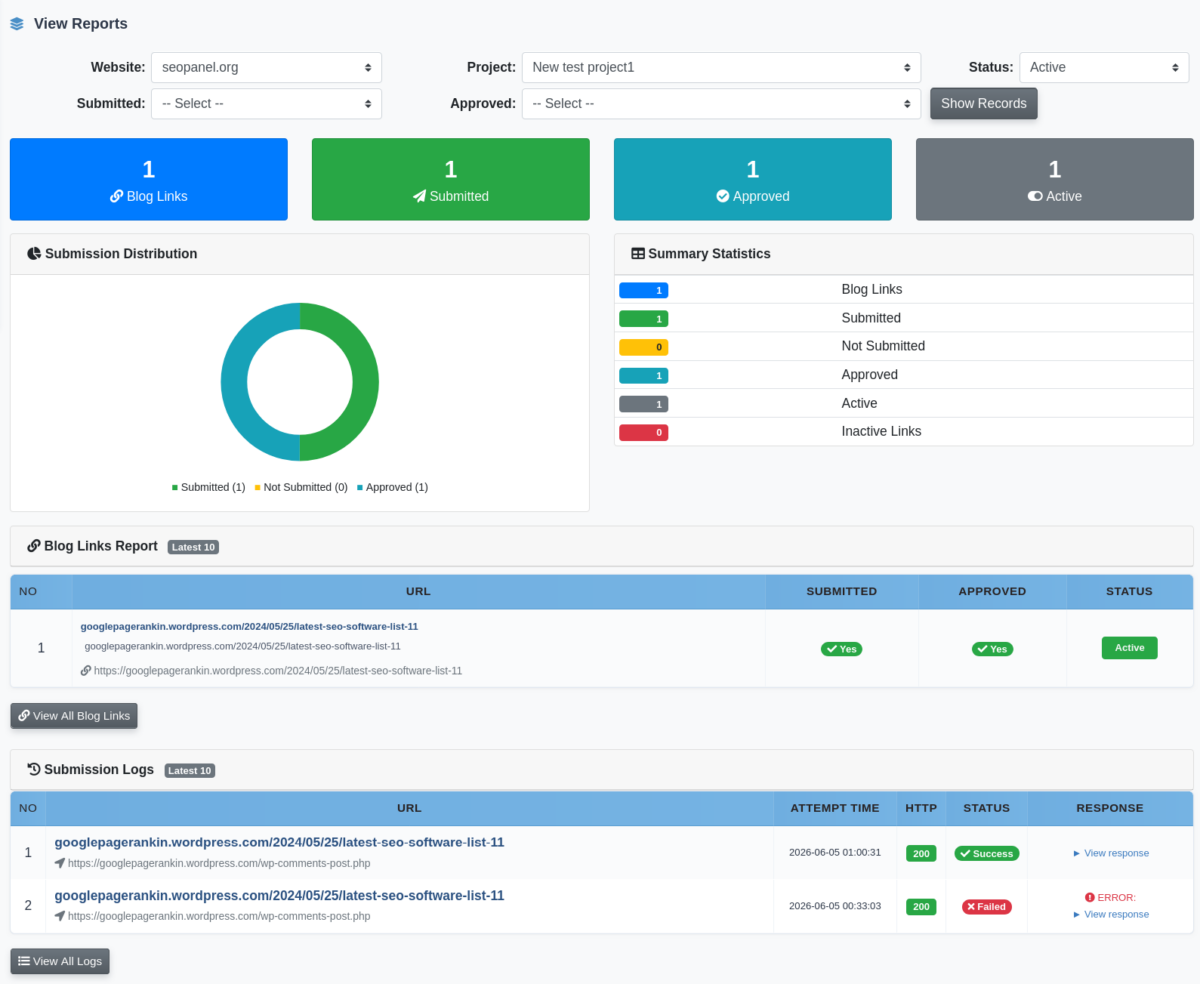
Every comment submission attempt is now fully logged with HTTP status code, server response and error details. Access per-link logs via the history icon in the links table, or browse the complete Submission Logs page for a full audit trail.

04

Report Summary Dashboard

The View Reports screen has been redesigned with stat cards, a submission distribution donut chart and a summary statistics panel. It also shows the latest 10 submission log entries inline, with a View All button to jump to the full logs.

05

Smart Submission Detection

The plugin now accurately detects HTTP 4xx / 5xx server rejections as well as WordPress error patterns in the response body. This eliminates the false-positive “Submitted: Yes” that used to appear when a comment was silently rejected by the server.

Supported Platforms

Blog Community 3.0.0 launches with two active blog types, with more rolling out in upcoming releases:

✓ WordPress.com
✓ Hosted WordPress
⏳ Blogger / Blogspot
⏳ Tumblr
⏳ Reddit
⏳ LiveJournal
⏳ Medium

Administrators can also configure custom blog types with their own search engine, regex patterns and comment form selectors, making the plugin extensible to any platform you need.

How It Works

Setting up a project takes just a few minutes:

  1. Create a project for your website and target keyword.
  2. Choose a blog type (e.g. Hosted WordPress) and configure language and country.
  3. Add up to 10 comment templates per project.
  4. Run the crawler — it discovers blog posts via Google News RSS and automatically submits comments.
  5. Review full submission logs and the report dashboard for results.

You can also schedule everything via cron jobs for fully hands-free operation around the clock, and monitor live progress in the real-time live console with timestamped crawl iterations.

💡 Pro tip: Use the per-project language and country settings to target local blog communities in your SEO market — Google News RSS returns locally-indexed posts that are far more relevant than generic search results.

Requirements

Blog Community Plugin 3.0.0 requires SEO Panel 6.0.0 or higher. Built with PHP, MySQL, HTML5, CSS3, JavaScript and AJAX.

Pricing

Launch Rate — Limited Time

$30

$25

One-time purchase  ·  Lifetime updates  ·  All features included

Get Blog Community Plugin

Requires SEO Panel 6.0.0+

Get Started

Ready to automate your blog commenting and build quality backlinks across the web? Pick up Blog Community 3.0.0 today and take advantage of the launch-rate pricing while it lasts.
Get the Plugin

📊 Bulk Rank Checker Plugin 3.0.0 — Website-Linked Campaigns, Smart Filters & Performance Boost


WEBSITE-LINKED CAMPAIGNS, SMART CAMPAIGN FILTERS, SERP RESULTS VIEWER, AND IMPROVED PERFORMANCE — YOUR BULK RANK TRACKING JUST GOT SMARTER.

⬇ Download Bulk Rank Checker Plugin 3.0.0

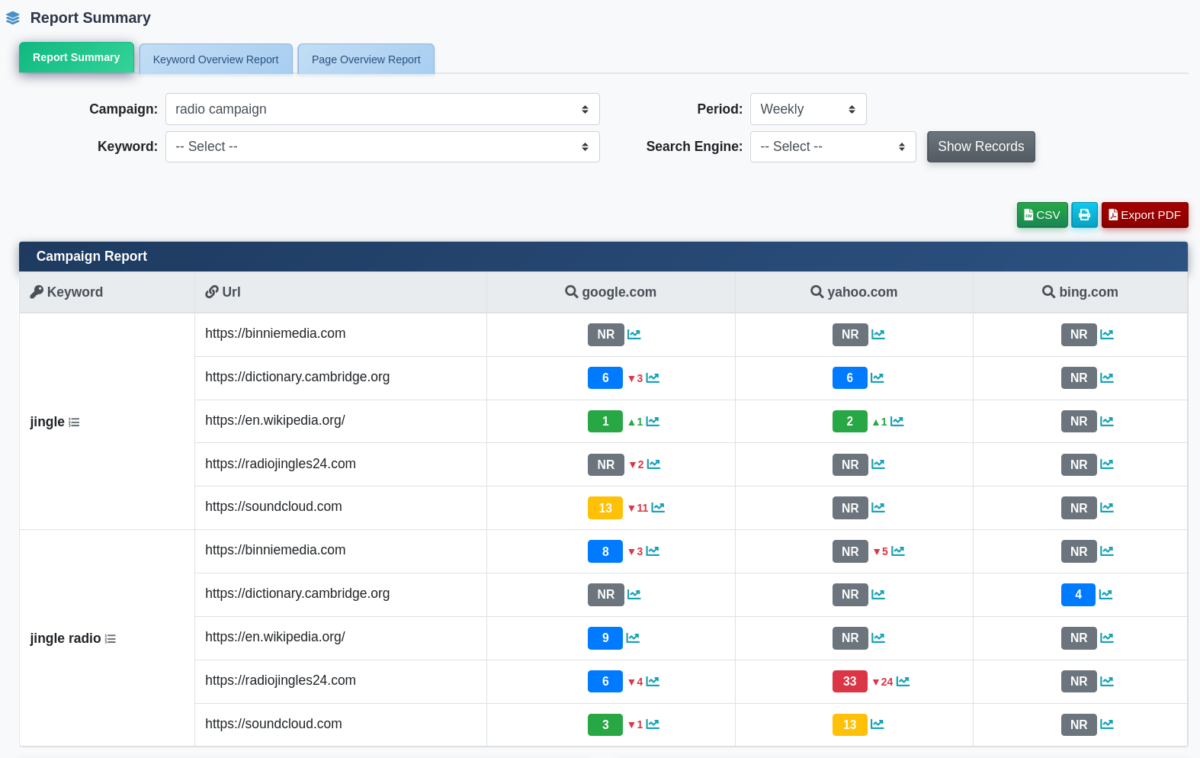
We are excited to announce Bulk Rank Checker Plugin version 3.0.0 for SEO Panel — a major release that brings campaigns closer to your website structure, adds smart filtering to the Campaign Manager, and introduces a brand-new SERP results viewer so you can see exactly what the search engine returned for every keyword. Whether you manage rank tracking for one site or many, this update makes the whole workflow more organised and transparent.


🆕 What’s New in Version 3.0.0

🌐 Campaigns Are Now Linked to Websites

Campaigns in the Bulk Rank Checker are now directly associated with a specific website from your SEO Panel website list.

  • 📌 When creating or editing a campaign, you now select the website it belongs to — keeping your rank tracking neatly organised by site.
  • 🗂 The Campaign Manager list now shows the Website Name alongside each campaign, so you can see at a glance which site every campaign is tracking.
  • 🔄 Existing campaigns are migrated automatically on upgrade — no data is lost and no manual reassignment is needed.

🔍 New Campaign Manager Filters

The Campaign Manager now features two quick filters at the top of the list, making it easy to find exactly the campaigns you need:

  • 🌍 Website Filter — select any website from the dropdown to show only campaigns belonging to that site. Results update instantly without a page reload.
  • 🟢 Status Filter — filter campaigns by Active or Inactive to focus on what is currently running or what has been paused.
  • ⚡ Both filters work together seamlessly, making it fast to manage a large number of campaigns across multiple websites and users.

🔎 SERP Results Viewer

This is one of the most requested additions to the Bulk Rank Checker — the ability to see what the search engine actually returned when your keyword was checked.

  • 📋 The full SERP snapshot is now stored for every keyword and search engine run, giving you a complete picture of the competitive landscape at the time of the check.
  • 👁 Click to view the SERP results directly from the report — a clean popup shows the ranked URLs returned by the search engine for that keyword on that date.
  • 🔗 Each result in the SERP list is a clickable link, so you can quickly inspect competitor pages without leaving SEO Panel.
  • 📅 Results are stored historically, allowing you to review and compare SERP snapshots across different dates.

📧 Email Reports in PDF, CSV & HTML

Stay on top of your rankings without logging in — the Bulk Rank Checker can automatically email campaign reports to you and your team on a schedule.

  • 📄 PDF reports — professional, print-ready documents ideal for client presentations and stakeholder meetings, delivered straight to the inbox.
  • 📊 CSV reports — data-friendly exports perfect for importing into Excel, Google Sheets, or any analysis tool.
  • 🌐 HTML reports — fully formatted, interactive web reports viewable directly in any email client or browser.
  • 📬 Multiple recipients — add as many email addresses as you need so the whole team stays informed automatically.
  • Flexible schedule — choose daily, every 2 days, weekly, or monthly delivery to match your reporting cycle.

🚀 Performance Improvements

Version 3.0.0 includes behind-the-scenes performance improvements that speed up report generation and campaign processing — especially noticeable on installations with a large volume of campaigns and historical results accumulated over time.


⚡ Key Features Recap

  • 🤖 Automated bulk rank checking — track keyword positions across multiple URLs and search engines in a single campaign run.
  • 🌐 Website-linked campaigns — every campaign is now tied to a specific website for cleaner organisation and faster filtering.
  • 🔍 Smart Campaign Manager filters — instantly filter campaigns by website or status.
  • 🔎 SERP Results Viewer — store and review the full SERP snapshot for every keyword and search engine run.
  • 📊 Multiple report formats — get rank reports in HTML, PDF, or CSV format to suit your workflow.
  • 📈 Graphical & detailed reports — visualise rank trends over time with charts and full tabular breakdowns.
  • 📅 Flexible scheduling — schedule report generation daily, every 2 days, weekly, or monthly.
  • 📧 Automated email reports — send reports to multiple email addresses automatically for team collaboration.
  • 🗂 Archived historical reports — access past reports to track ranking progress over time.
  • 👥 Multi-user / multi-website support — manage campaigns for all websites and users from a single admin interface.
  • 🛠 User type settings — configure limits on keywords, URLs, and search engines per user type.
  • 🚀 Improved performance — faster report generation and campaign processing at scale.

📥 Download

⬇ Download Bulk Rank Checker Plugin 3.0.0

💬 Questions, issues, or feature requests? Open a ticket on our support forum or GitHub. We hope this release makes managing your keyword rank tracking campaigns faster, more organised, and more insightful than ever.

SEO Panel 6.0.0 Released – Seo Panel API, New Dashboard, DataForSEO & 3-Tier SERP Engine

We are excited to announce the release of SEO Panel 6.0.0 — our biggest update yet. This release introduces a native SEO Panel API integration, expanded DataForSEO coverage, a smarter 3-tier SERP engine, and a completely redesigned dashboard. Whether you’re tracking a handful of sites or managing hundreds of keywords across multiple clients, 6.0.0 gives you more power and visibility than ever before.


🚀 What’s New in SEO Panel 6.0.0


🔗 SEO Panel API Integration

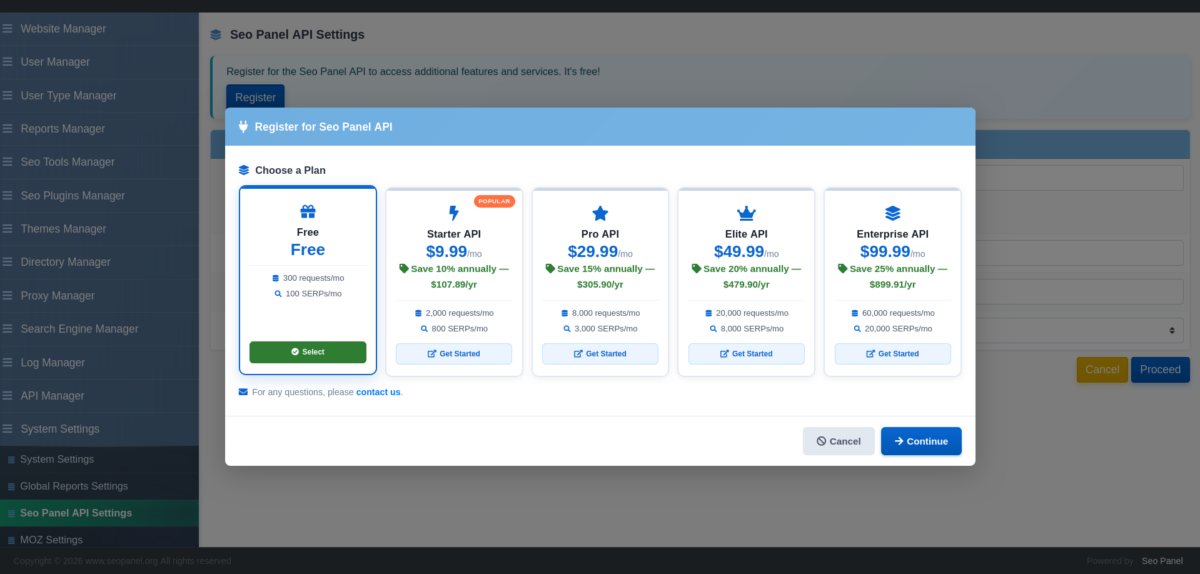
SEO Panel 6.0.0 ships with a built-in SEO Panel API (SP API) — a native SERP tracking service you can connect directly from your admin panel.

  • ✅ Register your installation from the admin panel — a complimentary tier is available to get started for free
  • 💳 Choose from multiple plan tiers with a built-in upgrade selector showing pricing and usage at a glance
  • 📉 Monitor your API usage and manage your plan without leaving SEO Panel
  • 🏷️ Annual discount pricing is now visible directly in the upgrade interface

📡 DataForSEO Integration

DataForSEO coverage has been significantly expanded in this release.

  • 🔍 SERP keyword tracking powered by DataForSEO for reliable, scalable rank checking
  • Async Review Checker — monitor reviews on Google, Trustpilot, and TripAdvisor using DataForSEO’s task API. Tasks are posted in one cron run and results fetched in the next, eliminating scraping timeouts and failures
  • 🔗 Backlink and saturation analysis via DataForSEO
  • 🖱️ Pending DataForSEO tasks can now be processed directly from the UI Report Generation Manager, with real-time progress streaming per keyword and incremental output flushing for browser-based monitoring

⚙️ 3-Tier SERP Engine

SEO Panel 6.0.0 introduces a smart 3-tier SERP source selection system that automatically falls back to the best available data source:

  1. 🥇 DataForSEO — preferred source for accuracy and scale
  2. 🥈 SEO Panel API — reliable fallback with the native SP API
  3. 🥉 Direct crawl — manual web crawling as the last resort

Unified helper methods ensure consistent configuration checks across all three tiers, making the system seamless and transparent to the end user.


🖥️ New Dashboard

The dashboard has been completely redesigned from the ground up. You now get a full summary of every SEO tool in one unified view — no more jumping between modules to get a picture of how your sites are performing.

  • 📊 Unified visibility across keyword rankings, backlinks, site audits, social metrics, reviews, and analytics
  • ⚡ Real-time insights into keyword distribution by rank position
  • 📈 Performance trend summaries at a glance

🛠️ Bug Fixes & Improvements

  • 🔐 Centralized API credential validation across all integrations
  • 🐛 Resolved silent failures in keyword rank checking
  • 🐛 Fixed report generation incorrectly falling through to manual crawling
  • 💰 Refined pricing UI with clearer annual discount visibility
  • 🛡️ GDPR cookie consent banner added for privacy compliance
  • ⚠️ Improved DataForSEO error messaging — API errors are now surfaced directly in the UI

Thank you to everyone who contributed feedback, bug reports, and suggestions that shaped this release. SEO Panel 6.0.0 is available now.

👉 Download SEO Panel 6.0.0 →

🐞 Have questions or found a bug? Open an issue on GitHub.

Seo Panel Business Theme 5.1.0 – A Premium Navy & Gold Experience

Version 5.1.0 Released

Seo Panel Business Theme

A sophisticated navy & gold theme designed for corporate websites, marketing agencies, and professional service providers — now updated for SEO Panel 5.1.0.

Get Business Theme

We are thrilled to announce the release of Business Theme 5.1.0 — the latest version of our premium navy and gold theme, now fully compatible with SEO Panel 5.1.0. This update brings enhanced styling, improved compatibility, and a refined experience across the platform.

What’s New in 5.1.0

  Full compatibility with SEO Panel 5.1.0

  Updated styling for new SEO Panel 5.1.0 interface elements

  Improved responsive layout and component rendering

  Refined gradient effects and animation performance

  Enhanced accessibility and cross-browser consistency

Existing customers get this update free — download the latest version from your account.

What’s Included

01

3,050+ Lines of Custom CSS

Meticulously crafted styling for every component of your SEO Panel interface.

02

10 Custom SVG Graphics

Professionally designed logos, patterns, icons, and badges included.

03

25+ Gradient Combinations

Modern gradient effects with animated shimmer and hover transitions.

04

Fully Responsive & Accessible

Works seamlessly across all devices with WCAG AA compliance for accessibility.

Perfect For

  Corporate Websites

  Marketing Agencies

  SEO Service Providers

  Business Consulting

  Enterprise Dashboards

  Digital Marketing Solutions

Premium Theme

$20

One-time purchase • Lifetime updates • All graphics included

Get Business Theme

Version: 5.1.0  • 
Requires: SEO Panel 5.1.0+  • 
Released: February 2026

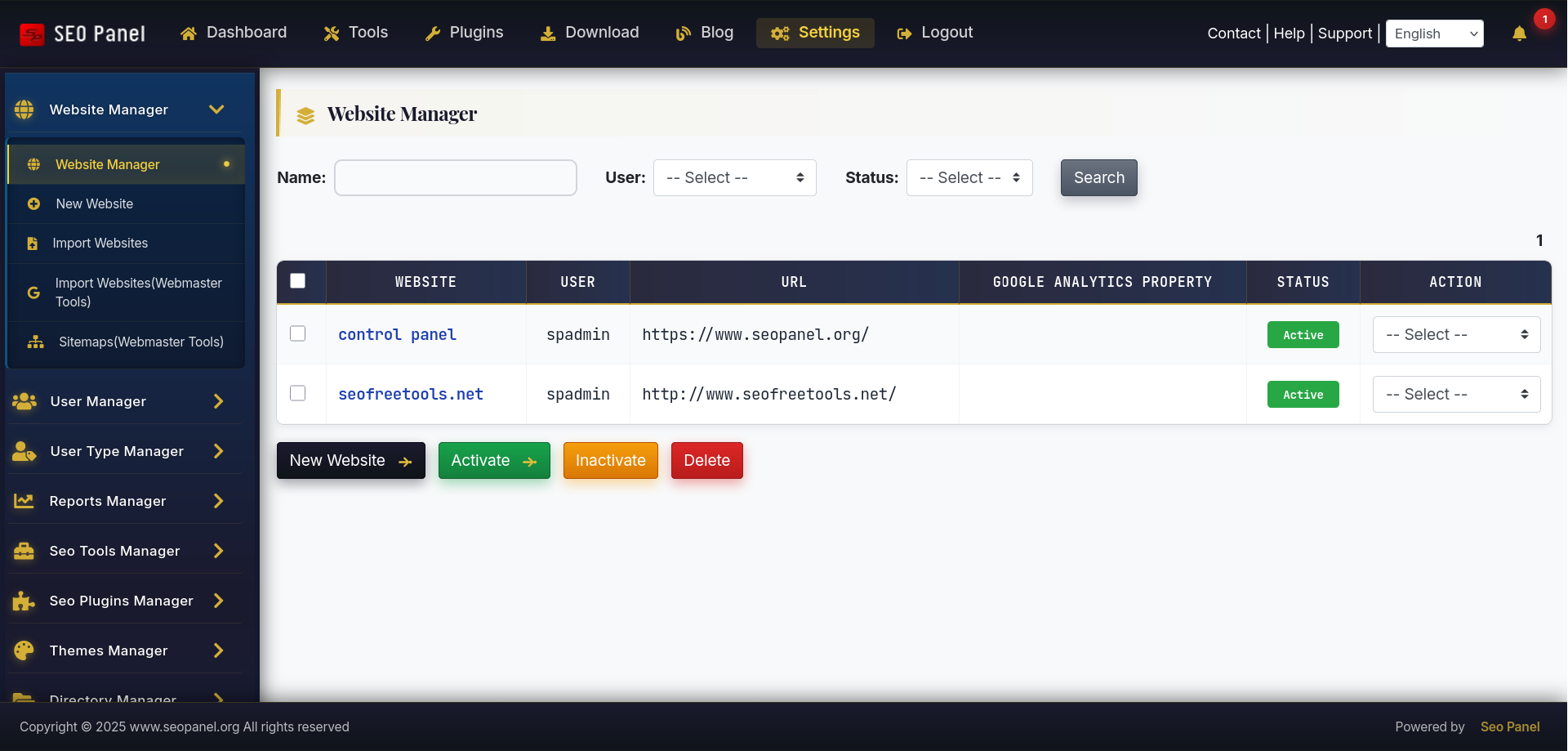
🚀 Membership Subscription Plugin 3.0.0: Powerful Subscription Management for SEO Panel

We’re excited to announce the release of Membership Subscription Plugin 3.0.0 for SEO Panel! This major update brings comprehensive subscription management capabilities to your SEO Panel installation, making it easier than ever to monetize your SEO services.

✨ What’s New in 3.0.0

💳 Enhanced Subscription Management

  • 🔄 Flexible Billing Cycles – Support for daily, weekly, monthly, quarterly, and annual subscriptions with custom intervals
  • 🎁 Trial Periods – Offer free or paid trial periods to convert more subscribers
  • ⚡ Automated Renewals – Seamless recurring billing with automatic payment processing
  • 💰 Multiple Payment Gateways – Expanded support for popular payment processors
  • 📊 Subscription Tiers – Create unlimited membership levels with different feature access

🔗 SEO Panel Integration

  • 🔐 Feature-Based Access Control – Restrict SEO Panel features based on subscription level
  • 🌐 Website Limits – Set maximum websites per subscription tier
  • 🔍 Keyword Tracking Limits – Control keyword tracking capacity by plan
  • 📈 Report Customization – Different reporting features for each membership level
  • 👥 User Management – Manage subscriber accounts directly from SEO Panel

✨ Improved User Experience

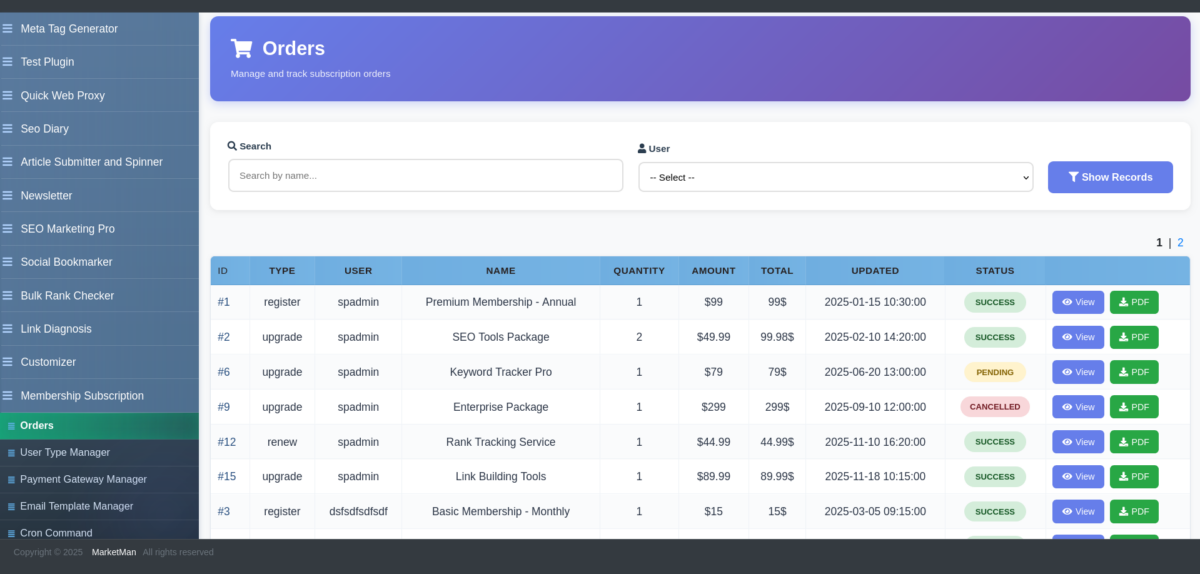
  • 🎨 Modern Admin Interface – Intuitive dashboard for managing subscriptions and members
  • 👤 Customer Portal – Self-service area where subscribers can upgrade, downgrade, or cancel plans
  • 📧 Email Notifications – Automated emails for renewals, expirations, payment failures, and upgrades
  • 📄 Invoice Generation – Professional PDF invoices sent automatically
  • 📜 Payment History – Complete transaction history for subscribers

💵 Revenue Management

  • 📊 Revenue Reporting – Comprehensive reports on subscription revenue and growth
  • 📉 Churn Analysis – Track subscription cancellations and identify trends
  • 💹 MRR/ARR Tracking – Monitor monthly and annual recurring revenue
  • 🎟️ Coupon System – Create discount codes for promotions and special offers

⚡ Performance Improvements

Version 3.0.0 includes significant performance optimizations:

  • 🚀 Optimized database queries for faster subscription processing
  • ⏰ Improved cron job efficiency for renewal handling
  • 💾 Reduced memory usage for large subscriber bases
  • ⚡ Enhanced caching for subscription data

🔒 Security Enhancements

Your subscribers’ data and payment information security is our top priority:

  • ✅ PCI DSS compliant payment processing
  • 🔐 Encrypted storage of sensitive data
  • 🛡️ Secure payment gateway integration
  • 📝 Comprehensive audit logging for all transactions
  • 🔒 SQL injection and XSS protection

💳 Supported Payment Gateways

Membership Subscription Plugin 3.0.0 seamlessly integrates with the most popular payment processors to give you and your subscribers flexibility and security:

💙 PayPal

Accept payments from millions of PayPal users worldwide. Features include:

  • 🌍 International payment processing
  • 🔒 Buyer and seller protection
  • 📱 Mobile-optimized checkout
  • 💰 Accept credit cards without merchant account

💜 Stripe

Modern payment infrastructure trusted by businesses of all sizes. Features include:

  • ⚡ Lightning-fast checkout experience
  • 💳 Support for all major credit and debit cards
  • 🔄 Automated subscription management
  • 📊 Advanced reporting and analytics
  • 🌐 Multi-currency support (135+ currencies)
  • 🛡️ Built-in fraud prevention

📥 Download & Get Started

The Membership Subscription Plugin 3.0.0 is available now for SEO Panel users. Transform your SEO Panel installation into a revenue-generating subscription service today!

💡 Use Cases

The Membership Subscription Plugin is perfect for:

  • 🏢 SEO Agencies – Offer tiered SEO monitoring packages to clients
  • 💼 SaaS Providers – Monetize your SEO Panel installation with recurring revenue
  • 👨‍💻 Freelancers – Provide ongoing SEO services with automatic billing
  • 🔄 Resellers – Create white-label SEO monitoring services

🎯 What’s Coming Next?

We’re continuously improving the plugin. Upcoming features include:

  • 📊 Advanced analytics dashboard
  • 💳 Additional payment gateway integrations
  • 🎁 Subscription gifting functionality
  • 🌍 Multi-currency support
  • 🤝 Affiliate program integration

💬 Support & Community

Need help or have questions about the Membership Subscription Plugin? Our community is here to support you:

  • 📚 Visit the SEO Panel website for documentation
  • 👥 Join our community forum for discussions and tips
  • 🐛 Report bugs or request features on GitHub
  • 💌 Contact our support team for assistance

Ready to monetize your SEO Panel? Download the Membership Subscription Plugin 3.0.0 today and start building your subscription-based SEO business!


Posted in SEO Panel, Plugin Updates, Announcements

Link Diagnosis Plugin 4.0.0 – Major Release with Enhanced Backlink Detection

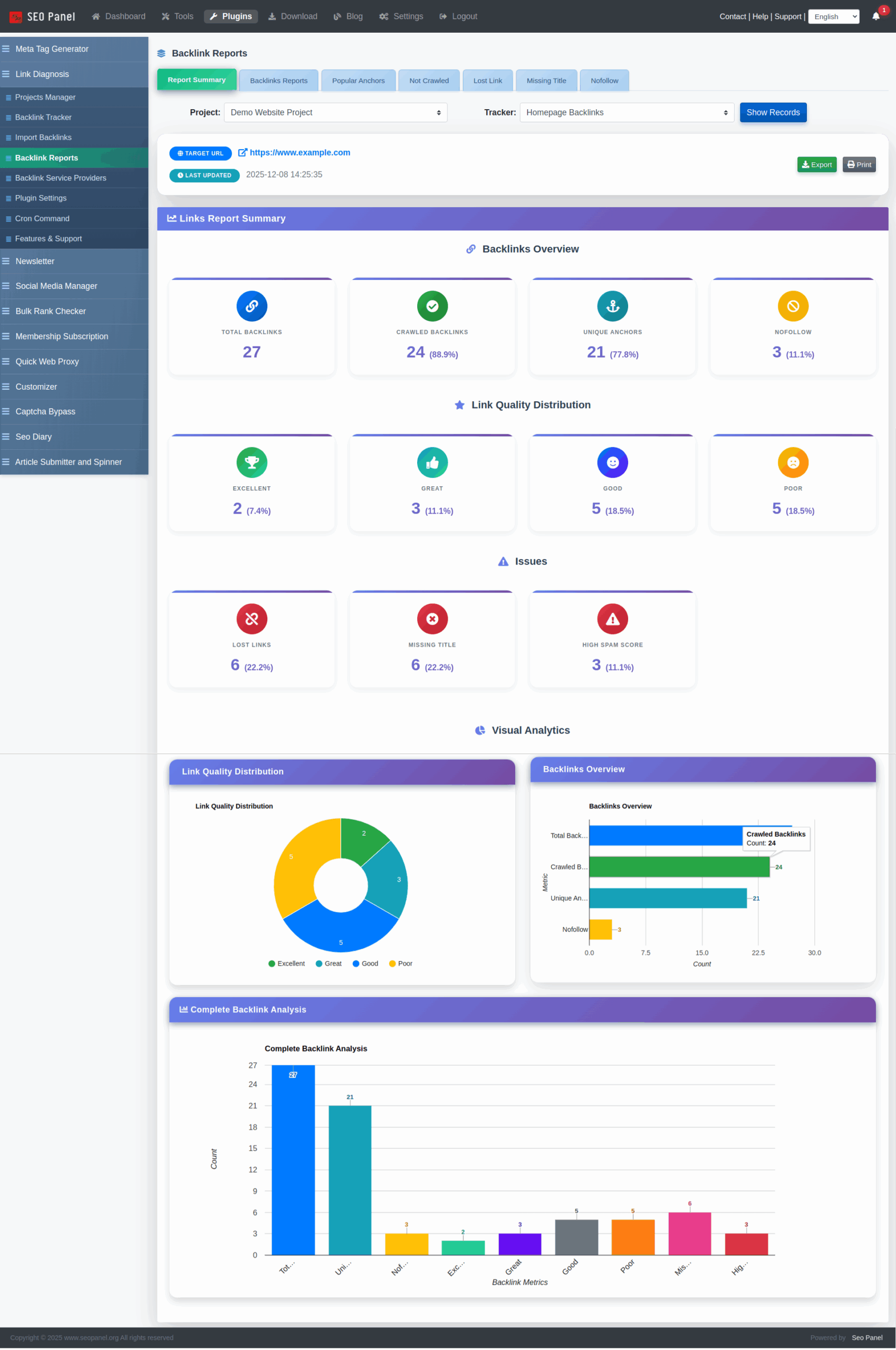
We’re excited to announce the release of Link Diagnosis Plugin 4.0.0 for SEO Panel! This major update brings significant improvements to backlink tracking accuracy, security enhancements, and a better user experience.

🔍 What’s New in Version 4.0.0

1. Multiple Backlinks Detection

One of the most requested features is finally here! The plugin now detects and tracks all backlinks on a single page, not just the first one.

  • Complete Coverage: When a page contains multiple links to your site, all of them are now detected and stored
  • Detailed Information: Each backlink includes:
    • Full URL
    • Anchor text
    • Dofollow/Nofollow status
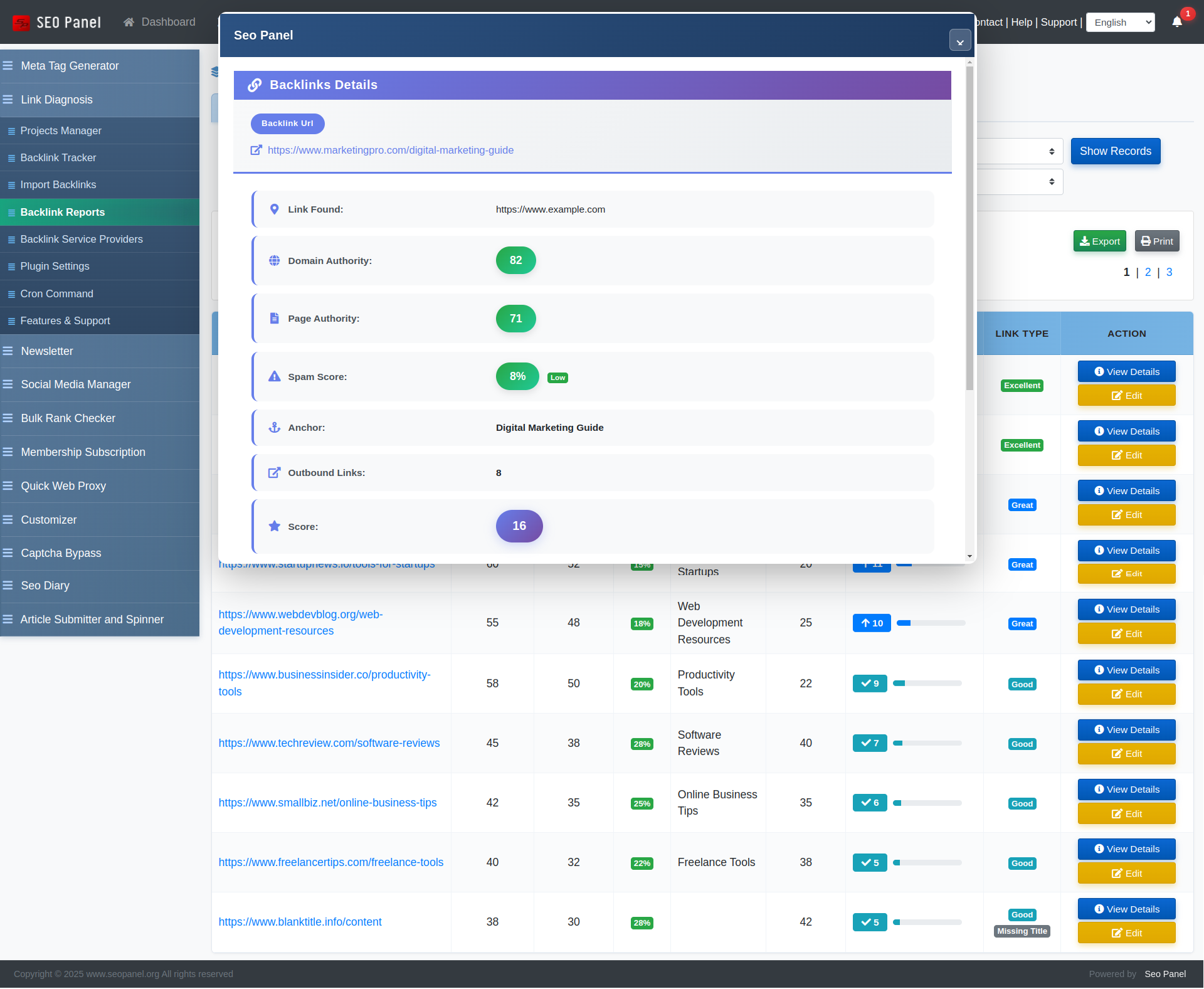
  • Visual Display: View all detected backlinks in an elegant popup interface
  • JSON Storage: All backlinks are stored efficiently in the database for future analysis

Example: If a blog post has 3 different links to your website with different anchor texts, you’ll now see all 3 backlinks tracked separately.

2. Improved URL Matching Algorithm

We’ve completely revamped the URL matching system for better accuracy:

  • Protocol Agnostic: Correctly matches HTTP and HTTPS versions
  • WWW Handling: Treats www and non-www versions as the same
  • Trailing Slash Normalization: Eliminates false negatives from trailing slashes
  • Case Insensitive: Works regardless of URL capitalization

This means fewer missed backlinks and more accurate reporting!

3. Enhanced Security

Security is a top priority. This release includes important security improvements:

  • Regex Injection Prevention: Fixed potential vulnerability in parameter parsing
  • Better Input Sanitization: All user inputs are properly validated and escaped
  • Secure HTML Parsing: Improved anchor tag attribute extraction with proper escaping

4. Optimized API Usage

Save money on third-party API credits with smarter API calls:

  • Conditional MOZ API Calls: Only calls MOZ API when a backlink is actually found
  • Error Detection: Distinguishes between broken links and fetch failures
  • No Wasted Credits: Skips API calls for dead pages and broken links

This can save you significant costs if you’re using MOZ or other paid backlink analysis services!

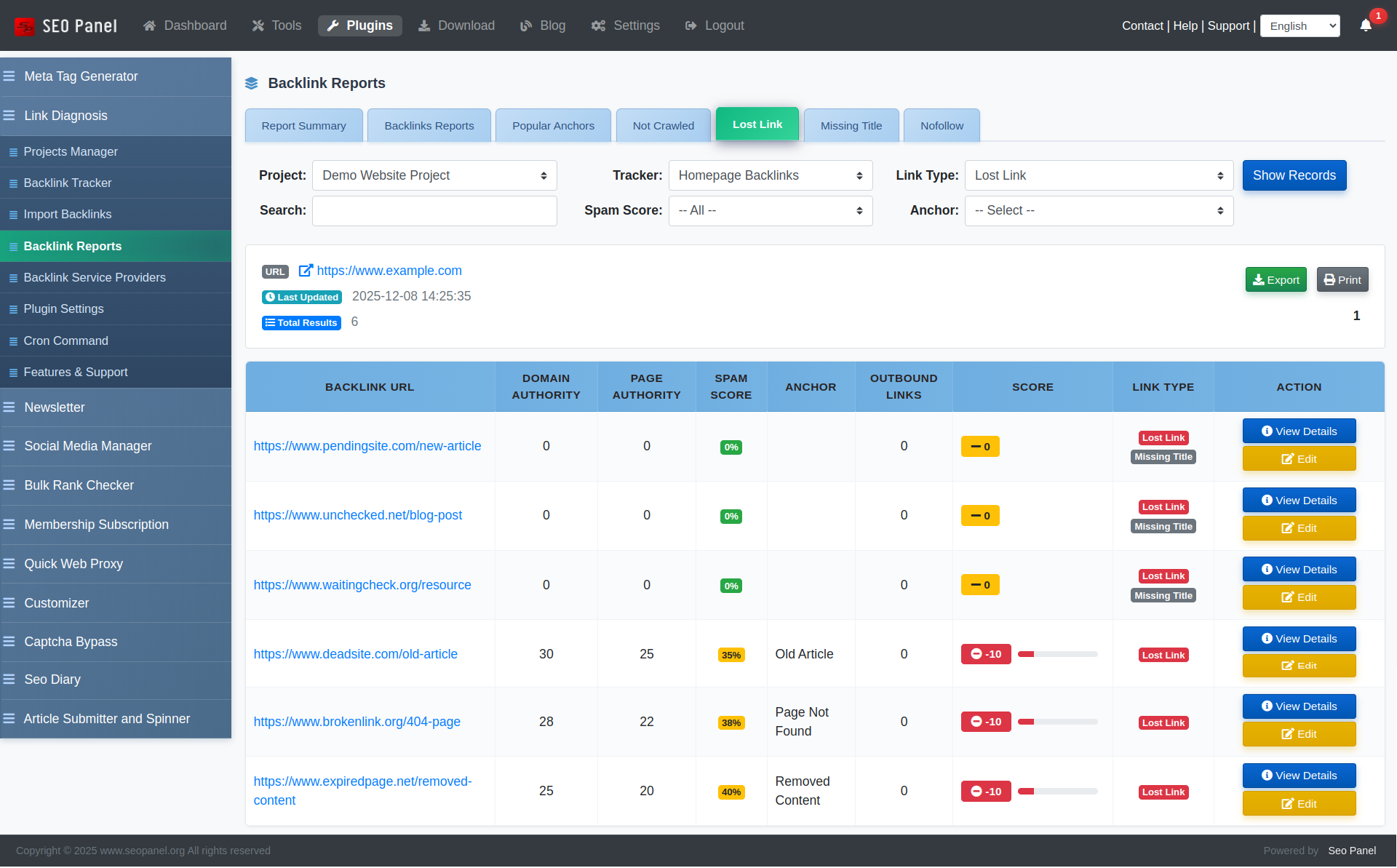
5. Better Error Handling

The plugin now provides more detailed information about backlink status:

  • Fetch Error Detection: Knows when a page couldn’t be accessed
  • Lost Link Tracking: Identifies when your backlink has been removed
  • Improved Reporting: Clear distinction between different failure types

6. Beautiful User Interface

We’ve redesigned the backlink details popup with a modern, clean interface:

  • Expandable Sections: Multiple backlinks displayed in a scrollable, organized list
  • Color-Coded Badges: Visual indicators for dofollow/nofollow status
  • Responsive Design: Works perfectly on desktop and mobile devices
  • Quick Overview: See the number of backlinks at a glance

🚀 Performance Improvements

  • Faster Crawling: Optimized backlink detection algorithm
  • Reduced Memory Usage: More efficient data structures
  • Better Cron Job Performance: Improved bulk processing for scheduled reports

💡 Use Cases

This release is perfect for:

  • SEO Agencies: Track multiple client backlinks more accurately
  • Content Marketers: Monitor guest post backlinks across different sites
  • Link Builders: Verify all backlinks from outreach campaigns
  • Website Owners: Keep detailed records of your link profile

🎯 Real-World Example

Scenario: You publish a guest post on a popular blog. The author includes:

  • A dofollow link in your author bio
  • A contextual link within the article content
  • A nofollow link in the comments section

Before 4.0.0: Only the first link was detected
After 4.0.0: All three links are tracked with complete details!

🔮 What’s Next?

We’re already working on future enhancements:

  • Anchor text distribution analysis
  • Historical backlink tracking
  • Competitor backlink comparison
  • Email alerts for lost backlinks
  • Integration with more backlink data providers

🙏 Thank You

This release includes improvements suggested by our community. Thank you for your feedback and support!


Download Link Diagnosis Plugin 4.0.0 today and take your backlink monitoring to the next level!

Compatible with SEO Panel 5.0+ | Requires PHP 7.2+ | MySQL 5.6+

Stay Updated:
Follow us on Twitter | Subscribe to our newsletter | Join our community forum

SEO Panel Customizer Plugin: Take Full Control of Your SEO Dashboard

Managing multiple websites’ SEO performance requires a dashboard that adapts to your specific needs. That’s where the SEO Panel Customizer plugin comes in—a powerful tool that transforms your SEO Panel experience from a one-size-fits-all solution into a personalized command center.

🎯 What is the SEO Panel Customizer Plugin?

The SEO Panel Customizer is an official plugin for SEO Panel, the popular open-source SEO control panel. This plugin allows you to customize nearly every aspect of your SEO Panel interface, from layout and branding to feature visibility and widget placement.

Whether you’re a white-label agency wanting to brand the panel for clients, or a power user who wants to streamline your workflow by hiding unused features, the Customizer plugin gives you that flexibility.

✨ Key Features That Make a Difference

1. 🎨 Complete Branding Control

Replace the default SEO Panel branding with your own:

  • Upload custom logos and favicons
  • Change color schemes to match your brand identity
  • Customize the dashboard title and footer text
  • Add custom CSS for pixel-perfect design control

Perfect for agencies offering white-label SEO services to clients who want a seamless, branded experience.

2. 📊 Dashboard Layout Customization

Not everyone needs access to every feature. The Customizer lets you:

  • Show or hide specific menu items
  • Reorder dashboard widgets
  • Create custom dashboard layouts for different user roles
  • Toggle visibility of SEO tools based on your workflow

This means your team sees only the tools they need, reducing clutter and improving productivity.

3. 👥 Role-Based Customization

Different users have different needs. With role-based customization, you can:

  • Create unique dashboard experiences for administrators, managers, and regular users
  • Control which features are accessible to each user role
  • Simplify the interface for clients while maintaining full control for your team

4. 🧩 Custom Widget Management

Take control of your dashboard widgets:

  • Add custom widgets with your own HTML, JavaScript, or embedded content
  • Integrate third-party analytics or monitoring tools
  • Display custom reports, KPIs, or client-specific information
  • Arrange widgets in the order that makes sense for your workflow

💼 Real-World Use Cases

🏢 For SEO Agencies

Create a fully branded SEO dashboard for each client. Hide backend complexity, showcase only relevant metrics, and add your agency logo and colors throughout. Your clients get a professional, branded experience that reinforces your value.

👨‍💼or In-House SEO Teams

Streamline your team’s workflow by creating role-specific dashboards. Content creators see keyword rankings and content audit tools, while technical SEOs focus on site auditor results and backlink profiles. Everyone gets exactly what they need, nothing more.

💻 For Freelancers

Build a professional-looking dashboard that impresses clients without the cost of expensive enterprise SEO tools. Customize the interface to highlight the metrics your clients care about most, making reporting sessions more effective.

⚙ How to Install the Customizer Plugin

Installing the SEO Panel Customizer plugin is straightforward:

  1. Log in to your SEO Panel admin dashboard
  2. Navigate to System → Plugins
  3. Find “Customizer” in the available plugins list
  4. Click Activate
  5. Access the customizer settings from System → Customizer Settings

If you’re using SEO Panel 5.0 or later, the plugin comes pre-installed and just needs to be activated.

🚀 Getting Started with Customization

Once activated, here’s how to make your first customizations:

Step 1: Update Your Branding

  • Go to Customizer Settings → Branding
  • Upload your logo (recommended size: 200×60 pixels)
  • Add your favicon (16×16 or 32×32 pixels)
  • Update the dashboard title and footer text

Step 2: Choose Your Color Scheme

  • Navigate to Customizer Settings → Appearance
  • Select primary and secondary brand colors
  • Adjust accent colors for buttons and links
  • Preview changes in real-time before saving

Step 3: Customize Your Layout

  • Go to Customizer Settings → Layout
  • Toggle visibility for menu items you don’t use
  • Reorder menu items by drag-and-drop
  • Configure dashboard widgets and their positions

💡 Pro Tips for Maximum Effectiveness

  • Start Simple: Don’t customize everything at once. Start with branding, then gradually adjust layout and features based on actual usage patterns.
  • Test with Different User Roles: Log in as different user types to ensure each role sees appropriate features.
  • Keep Backup Settings: Before making major changes, document your current settings so you can revert if needed.
  • Use Custom CSS Sparingly: While custom CSS gives unlimited control, use it judiciously to maintain upgrade compatibility.
  • Gather User Feedback: If you’re managing a team, get input on which features they use most and customize accordingly.

✅ Compatibility and Requirements

The SEO Panel Customizer plugin works with:

  • SEO Panel 4.8.0 and above
  • All major themes (Classic, Modern, Bootstrap)
  • PHP 7.2 or higher
  • MySQL 5.6 or higher

The plugin is actively maintained and receives regular updates to support new SEO Panel versions.

🌟 Why Customization Matters

In today’s competitive SEO landscape, having powerful tools isn’t enough—you need tools that work the way you work. The SEO Panel Customizer plugin bridges the gap between generic software and personalized solutions.

Whether you’re building a brand, optimizing workflows, or creating client-specific experiences, the ability to customize your SEO dashboard isn’t just a nice-to-have—it’s a competitive advantage.

🎉 Conclusion

The SEO Panel Customizer plugin transforms an already powerful open-source SEO tool into a fully personalized platform that adapts to your exact needs. From white-label branding to workflow optimization, it gives you the flexibility to create the perfect SEO dashboard.

Best of all, it’s completely free and open-source, just like SEO Panel itself. There are no hidden costs, no premium tiers—just powerful customization at your fingertips.

Ready to take control of your SEO dashboard? Install the Customizer plugin today and discover how a personalized interface can streamline your SEO workflow and impress your clients.


Have you used the SEO Panel Customizer plugin? Share your customization tips and experiences in the comments below!

Introducing the Business Theme: Elevate Your SEO Panel Experience

We’re excited to announce the release of our latest premium theme for SEO Panel – the Business Theme. Designed specifically for corporate websites, marketing agencies, and professional service providers, this sophisticated theme brings a new level of polish and professionalism to your SEO management dashboard.

🎉 Special Launch Price: Only $15 (Save $5!)

⬇️ Download Business Theme Now

⭐⭐⭐⭐⭐ Rated 5/5 Stars | 30+ Downloads | SEO Panel 5.0.0+

A Professional Look That Means Business

The Business Theme features a carefully crafted navy and gold color scheme that exudes corporate sophistication. Gone are the days of settling for generic admin interfaces. With this theme, your SEO Panel installation will look as professional as the services you provide.

Stunning Visual Design

The color palette combines deep navy blues (#1a1a2e, #16213e, #0f1419) with elegant gold accents (#f4d03f, #d4af37, #c5a028), creating a visual hierarchy that’s both attractive and functional. Every element has been thoughtfully designed to enhance usability while maintaining a premium aesthetic.

Feature-Rich and Fully Customized

The Business Theme isn’t just a simple color swap – it’s a comprehensive redesign that includes:

Custom Graphics Package

  • 10 Professional SVG Files including:
    • Custom professional logo
    • Hero section patterns
    • Animated button icons
    • Modern menu icons
    • Decorative elements
    • Status badges

Enhanced UI Components

The theme includes over 20 enhanced UI elements:

  • Eye-catching hero sections
  • Animated buttons with smooth transitions
  • Refined alert styling
  • Professional table accents
  • Section headers with gold borders
  • Informative info boxes
  • Form elements with subtle glow effects
  • Elegant shimmer animations
  • Card-style pagination

Technical Excellence

  • 3,050+ lines of CSS with 237+ enhancement lines
  • 25+ custom gradients for depth and visual interest
  • 3 custom keyframe animations for smooth interactions
  • Optimized for performance and responsiveness

Perfect for Professional Use Cases

The Business Theme has been specifically designed for:

  • Corporate websites
  • Professional service providers
  • B2B applications
  • Enterprise dashboards
  • Consulting firms
  • Marketing agencies
  • SEO service providers
  • Digital marketing platforms

Whether you’re managing SEO for multiple clients or running an in-house marketing team, this theme provides the professional appearance that instills confidence in your capabilities.

Seamless Integration

The Business Theme is built specifically for SEO Panel 5.0.0 and integrates seamlessly with all core features and plugins. Installation is simple, and switching between themes takes just seconds – though we’re confident once you see the Business Theme in action, you won’t want to switch back.

Exceptional Value

At just $15 (reduced from $20), the Business Theme delivers tremendous value. For less than the cost of a monthly coffee subscription, you can transform your SEO Panel installation into a professional-grade dashboard that reflects the quality of your work.

Get Started Today

Ready to elevate your SEO Panel experience? The Business Theme is available now for immediate download.

Download the Business Theme →


Pricing: $15 (25% savings from original $20)
Version: 1.0.0
Released: November 1, 2025
Downloads: Already popular with over 30 downloads
Rating: 5/5 stars

Transform your SEO Panel into a professional-grade dashboard today with the Business Theme. Your clients (and your team) will appreciate the difference.


Have questions about the Business Theme? Visit our support forums or contact us directly. We’re here to help you get the most out of SEO Panel.