
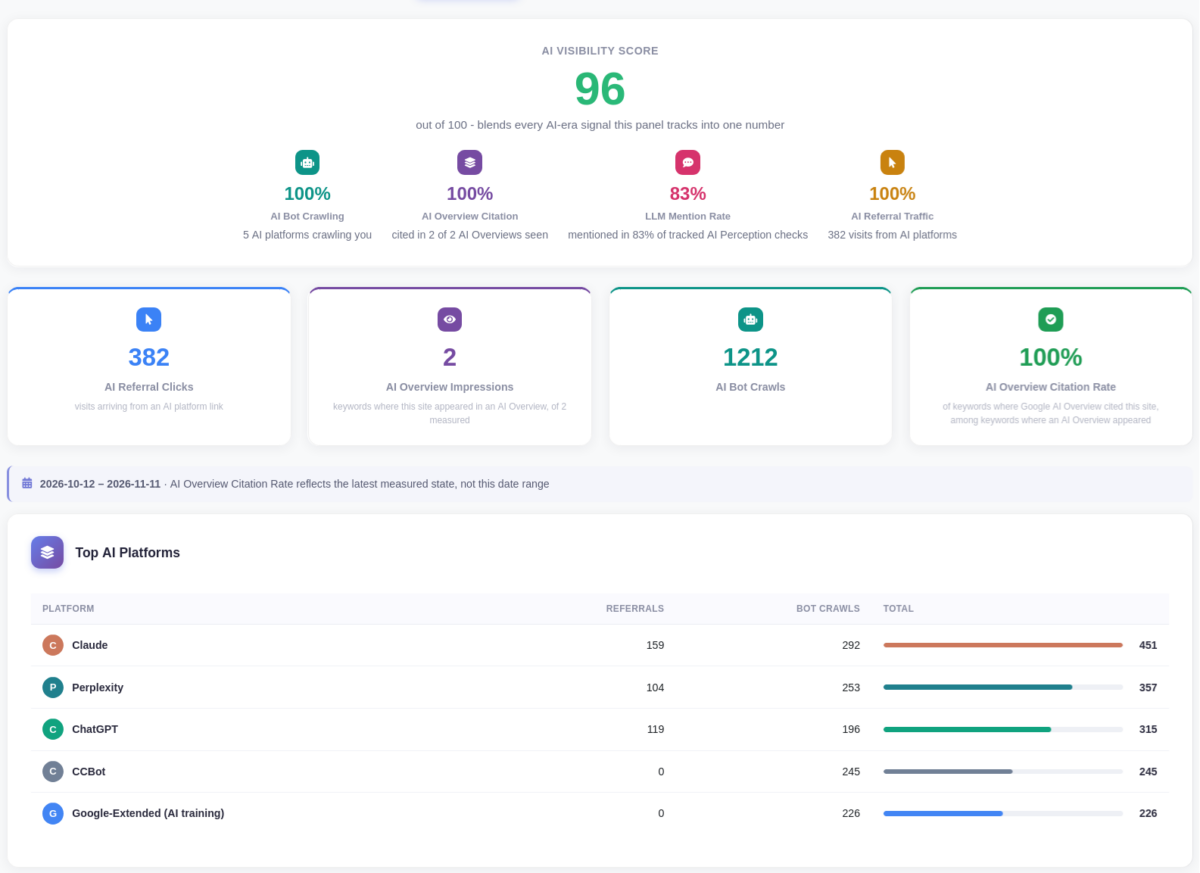
We’re excited to announce SEO Panel 7.0.0, the biggest release in the project’s history. While previous versions focused on traditional SEO: rankings, backlinks, site audits. This release adds a whole new dimension: tracking how your site shows up in AI-generated answers, from Google’s AI Overviews to ChatGPT, Claude, and Gemini.
Alongside the new AI tools, this release includes a comprehensive security-hardening pass, a redesigned dashboard, full PWA (installable app) support, and a guided onboarding flow for new users.
The new AI Visibility tools, now the first item in the Tools menu, with an at-a-glance AI Visibility Score.
AI Visibility: See How AI Search Engines See You
The headline feature of 7.0.0 is AI Visibility, a full suite for understanding and improving your presence in AI-driven search:
- AI Overview tracking: see whether your tracked keywords get cited inside Google’s AI Overview answers, and which competitor domains show up alongside you
- AI bot crawler detection: know when AI crawlers (GPTBot, ClaudeBot, PerplexityBot, and more) are actually visiting your site, straight from your access logs
- AI referral tracking: measure real traffic arriving from AI platform links, with an ROI view when Google Analytics is connected
- robots.txt / llms.txt control panel: manage AI crawler access rules directly from the dashboard, including a zero-touch WordPress install option
- A unified AI Visibility Score: one number (0-100) that rolls up everything above, with a Share of Voice breakdown and competitor keyword drill-down
- Weekly digest emails and a compliance audit trail export for teams that need one
For privacy-conscious teams, AI Visibility also supports Local AI via Ollama: run checks against your own locally-hosted model instead of a third-party API. And for anyone building AI agents or MCP-based workflows, there’s a built-in MCP server so assistants can query your SEO data directly.
AI Perception Check: Ask AI What It Actually Knows About You
Unlike the rest of AI Visibility, which measures how AI search engines cite you, AI Perception Check asks real AI assistants directly: “What do you know about this website?” Point it at ChatGPT, Claude, or Gemini using your own API key, and get a live, uncached answer, not a simulation.
- Scheduled weekly tracking of your own prompts, so you can watch an answer evolve over time
- Sentiment classification on every response
- AI-suggested prompts to get started quickly
- Competitive share-of-voice and alerting when something changes
AI Insights, Reimagined
The old Recommendations engine has been rebuilt from the ground up as AI Insights, a data-driven rules engine that runs on a daily scheduler and emails you a digest of genuinely new findings, instead of repeating the same advice every day. This release adds 13 new recommendation generators spanning every tool in the panel.
Also New in This Release
- AI Schema Markup Generator: generate structured data (JSON-LD) for your pages in a few clicks
- Site Auditor now includes AI-readiness checks and a structured-data audit
- Backlink Checker gains DataForSEO as an alternative to Moz
- AI-generated trend summaries added across Rank Checker, Backlink Checker, Saturation Checker, Social Media, and Review Manager
- A guided Setup Tour for new installs, with live connection checks and translations into 9 languages
- A one-click online upgrade option under Settings > Version, alongside the existing manual upgrade wizard
- Opt-in two-factor authentication (TOTP) and an admin action audit log
- Full PWA support: install SEO Panel as an app on your phone’s home screen, with a mobile bottom tab bar and edge-to-edge layout
- A redesigned main dashboard and guest homepage
The refreshed admin interface.
A Major Security Hardening Pass
This release also includes the most extensive security audit in the project’s history. Highlights include:
- Fixes for insecure direct object reference (IDOR) issues across nearly every tool, including Websites, Keywords, Site Auditor, Webmaster Tools, Website Analytics, Social Media, Review Manager, Directory Submission, PageSpeed, Reports, and the REST API
- SQL injection, stored/reflected XSS, and CSRF fixes across multiple modules
- An SSRF fix in the core crawler and in Settings
- Password storage migrated from unsalted MD5 to bcrypt, with brute-force protection and breached-password rejection
- Session hardening (fixation prevention, HttpOnly/SameSite/Secure cookies)
- Google OAuth tokens now encrypted at rest
- A fix for an unauthenticated account-takeover vulnerability
- Vendored dependencies upgraded to close known CVEs
If you’re running an older version, we strongly recommend upgrading promptly given the scope of these fixes.
Performance & Reliability
- A resumable background job queue for long-running tasks, on by default
- New database indexes across rank/backlink/search history tables; remaining tables converted to InnoDB
- Multiple N+1 and redundant-query fixes across the dashboard, Site Auditor, and Reports
- A live progress bar during install/upgrade database migration
How to Upgrade
Existing installs can upgrade with one click from Settings > Version, or via the manual upgrade wizard at install/upgrade.php. As always, back up your database before upgrading.
New to SEO Panel? Download 7.0.0 and follow the guided Setup Tour to get started.