Social Bookmarker
Social Bookmarker Plugin
v2.0.0
Share links to 150+ social networks directly from SEO Panel — fast & fully automated.
Download
Social Bookmarker is a powerful SEO Panel plugin that enables quick sharing of your links across top social networking and bookmarking sites including Facebook, Twitter/X, LinkedIn, Pinterest, Reddit, Threads, WhatsApp, Telegram, Bluesky, and many more.
There are about 150 social networking sites available with this plugin. It helps you submit your links to these sites within a short period of time — boosting traffic, backlinks, and brand visibility simultaneously.
The plugin menu provides the following sections:
- Projects Manager – Create and manage social bookmarking campaigns
- Run Project – Submit a project’s link to social bookmarking sites
- Social Bookmarker Manager – Manage the list of social bookmarking sites
- Plugin Settings – Configure plugin-level settings
Projects Manager
Projects Manager is used to create and manage social bookmarking projects. Each project holds the details of a link you want to share across social networks.
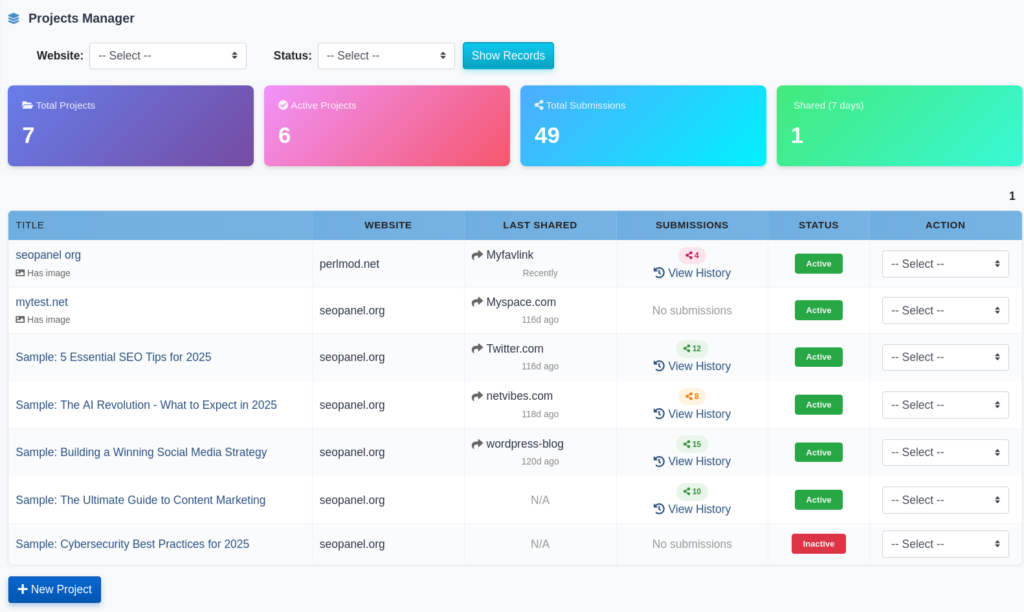
The Projects Manager dashboard shows summary statistics cards at the top:
- Total Projects – Total number of projects created
- Active Projects – Number of currently active projects
- Total Submissions – Cumulative number of submissions made across all projects
- Shared (7 days) – Number of submissions made in the last 7 days
Creating a New Project
To create a new project:
- Click on New Project
- Select the Website the project belongs to
- Enter the URL of the page you want to share. You can click the Crawl button to automatically fetch the page’s meta title and description.
- Enter a Title for the share
- Enter a Description for the share
- Enter Tags (comma-separated keywords)
- Optionally upload a Feature Image (JPG, PNG or GIF, up to 5 MB) or enter a public Image URL — used by social sites that support image sharing
- Click Proceed to save the project
The project list shows each project with its website, last shared site, submission count, and status. You can click View History on any project to see its full submission timeline.
Project Actions
Each project in the list supports the following actions from the action dropdown:
- Run Project – Launch the submission process for that project
- Activate / Inactivate – Toggle the project status
- Edit – Modify the project details
- Delete – Remove the project
Run Project
Run Project is used to submit a project’s link to social bookmarking sites. Select the website, project, and social bookmarking site, then click Submit.
To run a project:
- Select the Website
- Select the Project
- Select the Social Bookmarker (the social networking site to submit to)
- Click Submit
The submission interface opens with navigation tabs:
- Login – Log in to the selected social site
- Submit – Submit the link (the site’s submission page loads in an iframe or a popup window)
- Register – Register for the selected social site if you don’t have an account
Use the Previous and Next buttons to cycle through social bookmarking sites in sequence, enabling rapid submission to multiple sites in one session.
Note
If a project uses a locally uploaded feature image, a warning is displayed when the selected social site uses the [[image]] parameter. To resolve this, edit the project and replace the uploaded image with a publicly accessible image URL.
Social Bookmarker Manager
Social Bookmarker Manager shows the full list of social bookmarking and networking sites registered in the plugin. Each entry includes the site name, submit link template, rank, and status.
Searching and Filtering
Use the search box to filter sites by name and the status dropdown to filter by Active or Inactive status.
Site Actions
Each site supports the following actions:
- Activate / Inactivate – Toggle the site’s availability for project submission
- Edit – Modify the site’s name, submit link, register link, login link, rank, iframe setting, and status
- Delete – Remove the site from the list
Adding a New Social Bookmarking Site
To add a custom social bookmarking site:
- Click New Social Bookmarker
- Enter the Engine Name (display name of the site)
- Enter the Submit Link — the URL template used for submitting. Use the following placeholders:
[[url]] – replaced with the project’s share URL[[title]] – replaced with the project’s share title[[description]] – replaced with the project’s share description[[tags]] – replaced with the project’s share tags[[image]] – replaced with the project’s feature image URL
- Enter the Register Link – the URL to register for the site
- Enter the Login Link – the URL to log in to the site
- Set the Rank (lower number = higher priority)
- Set iFrame to Yes if the site can load inside an iframe, or No to open in a popup
- Set Status to Active or Inactive
- Click Proceed to save
Verifying All Sites
Click Verify All to run a check on all registered social bookmarking sites and confirm which ones are still active and reachable.
Submission History
Every project maintains a full submission history. Click View History next to any project in the Projects Manager to see the complete submission timeline.
The history page shows:
- A project summary with the share URL and website name
- Statistics – Total submissions, Successful, Skipped, and Failed counts
- A timeline of individual submissions, each showing:
- The social bookmarking site name
- Date and time of submission (with relative time, e.g. “3d ago”)
- Submission status: Submitted, Skipped, or Failed
- Any notes associated with the submission
Plugin Settings
Plugin Settings allow administrators to control user access permissions for the plugin.
The following settings are available:
- Allow user to access project manager – When enabled, non-admin users can access the Projects Manager and Run Project sections
- Allow user to access social bookmarker manager – When enabled, non-admin users can access the Social Bookmarker Manager
To update settings:
- Select Yes or No for each option
- Click Proceed to save
Supported Social Bookmarking Networks
The plugin comes pre-loaded with approximately 150 social bookmarking and networking sites. Active sites include:
- Threads
- WhatsApp
- Twitter / X
- Microsoft Teams
- Weibo
- Skype
- Facebook
- LinkedIn
- Pinterest
- Reddit
- Tumblr
- Telegram
- Bluesky
- Pocket
- Mastodon
- Mix
- Flipboard
- Instapaper
- Buffer
- Diigo
- And many more
Custom sites can be added at any time through the Social Bookmarker Manager.
Social Bookmarker
Social Bookmarker is a powerful SEO Panel plugin that enables quick sharing of your links across top social networking and bookmarking sites including Facebook, Twitter/X, LinkedIn, Pinterest, Reddit, Threads, WhatsApp, Telegram, Bluesky, and many more.
There are about 150 social networking sites available with this plugin. It helps you submit your links to these sites within a short period of time — boosting traffic, backlinks, and brand visibility simultaneously.
The plugin menu provides the following sections:
Projects Manager
Projects Manager is used to create and manage social bookmarking projects. Each project holds the details of a link you want to share across social networks.
The Projects Manager dashboard shows summary statistics cards at the top:
Creating a New Project
To create a new project:
The project list shows each project with its website, last shared site, submission count, and status. You can click View History on any project to see its full submission timeline.
Project Actions
Each project in the list supports the following actions from the action dropdown:
Run Project
Run Project is used to submit a project’s link to social bookmarking sites. Select the website, project, and social bookmarking site, then click Submit.
To run a project:
The submission interface opens with navigation tabs:
Use the Previous and Next buttons to cycle through social bookmarking sites in sequence, enabling rapid submission to multiple sites in one session.
Note
If a project uses a locally uploaded feature image, a warning is displayed when the selected social site uses the
[[image]]parameter. To resolve this, edit the project and replace the uploaded image with a publicly accessible image URL.Social Bookmarker Manager
Social Bookmarker Manager shows the full list of social bookmarking and networking sites registered in the plugin. Each entry includes the site name, submit link template, rank, and status.
Searching and Filtering
Use the search box to filter sites by name and the status dropdown to filter by Active or Inactive status.
Site Actions
Each site supports the following actions:
Adding a New Social Bookmarking Site
To add a custom social bookmarking site:
[[url]]– replaced with the project’s share URL[[title]]– replaced with the project’s share title[[description]]– replaced with the project’s share description[[tags]]– replaced with the project’s share tags[[image]]– replaced with the project’s feature image URLVerifying All Sites
Click Verify All to run a check on all registered social bookmarking sites and confirm which ones are still active and reachable.
Submission History
Every project maintains a full submission history. Click View History next to any project in the Projects Manager to see the complete submission timeline.
The history page shows:
Plugin Settings
Plugin Settings allow administrators to control user access permissions for the plugin.
The following settings are available:
To update settings:
Supported Social Bookmarking Networks
The plugin comes pre-loaded with approximately 150 social bookmarking and networking sites. Active sites include:
Custom sites can be added at any time through the Social Bookmarker Manager.