API
The Seo Panel API provides an interface to allow you to access and perform actions in Seo Panel both from external applications and scripts as well as internal modules and addons.
The Seo Panel API supports response type: JSON
1. API Setup
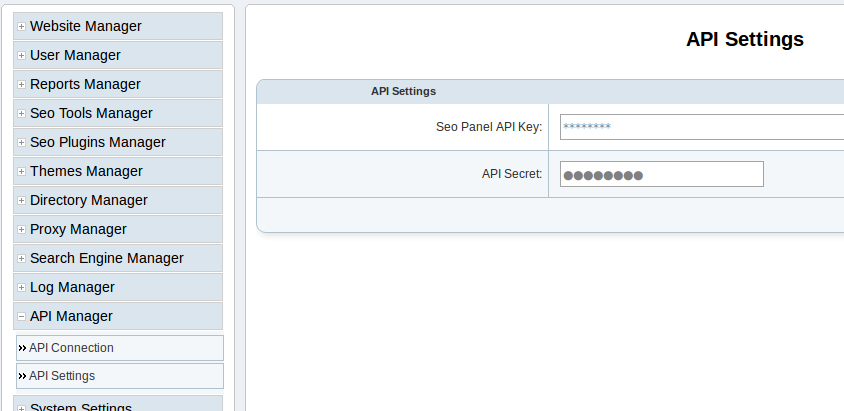
Login as admin and go to following page
Admin Panel => API Manager => API Settings
Change values of API Key and Secret for security according to the below screen shot.
2. Functions
The API currently supports the following functions
Website Management
Common Attributes
- SP_API_KEY => Seo panel api key
- API_SECRET => Seo panel api secret key
- category” = website
Add Website
Purpose
This command is used to add a new website in seo panel.
Attributes
- action = createWebsite
- name => The name of the website
- url => The url of the website
- user_id => The user id of website
Optional Attributes
- title => The title of the website
- description => The description of website
- keywords => The keywords of the website
- status => The status of the website - default[1]
Example Command
     <?php
$paramList['SP_API_KEY'] = "*******";
     $paramList['API_SECRET'] = "*******";
     $paramList['category'] = "website";
     $paramList['action'] = "createWebsite";
     $paramList['name'] = "test.com";
     $paramList['user_id'] = "1";
     $paramList['url'] = "http://test.com/";
Successful Response
- response = success
- result = Successfully created website
- website_id = The id of the website
Error Response
- response = Error
- error_msg = * Website already exist
Update Website
Purpose
This command is used to update existing website in seo panel.
Attributes
- action = updateWebsite
- id => The id of the website
Optional Attributes
- name => The name of the website
- url => The url of the website
- user_id => The user id of website
- title => The title of the website
- description => The description of website
- keywords => The keywords of the website
- status => The status of the website - default[1]
Example Command
     <?php
$paramList['SP_API_KEY'] = "*******";
     $paramList['API_SECRET'] = "*******";
     $paramList['category'] = "website";
     $paramList['action'] = "updateWebsite";
     $paramList['id'] = 1;
     $paramList['name'] = "Test Website";
Successful Response
- response = success
- result = Successfully updated website
Error Response
- response = Error
- error_msg = The invalid website id provided
Delete Website
Purpose
This command is used to delete existing website in seo panel.
Attributes
- action = deleteWebsite
- id => The id of the website
Optional Attributes
Example Command
     <?php
$paramList['SP_API_KEY'] = "*******";
     $paramList['API_SECRET'] = "*******";
     $paramList['category'] = "website";
     $paramList['action'] = "deleteWebsite";
     $paramList['id'] = 1;
Successful Response
- response = success
- result = Successfully deleted website and related data
Error Response
- response = Error
- error_msg = The invalid website id provided
Get Website Details
Purpose
This command is used to get details of a website
Attributes
- action = getWebsiteInfo
- id => The id of the website
Optional Attributes
Example Command
     <?php
$paramList['SP_API_KEY'] = "*******";
     $paramList['API_SECRET'] = "*******";
     $paramList['category'] = "website";
     $paramList['action'] = "getWebsiteInfo";
     $paramList['id'] = 1;
Successful Response:
[response] => success
[result] => stdClass Object(
        [id] => website id
        [name] => website name
        [url] => website url
        [owner_name] => owner name
        [owner_email] => owner email
        [category] => website category
        [title] => website title
        [description] => website description
        [keywords] => website keywords
        [title2] => website title2 for directory submission
        [title3] => website title3 for directory submission
        [title4] => website title4 for directory submission
        [title5] => website title5 for directory submission
        [description2] => website description2 for directory submission
        [description3] => website description3 for directory submission
        [description4] => website description4 for directory submission
        [description5] => website description5 for directory submission
        [reciprocal_url] => reciprocal url for directory submission
        [user_id] => user id
        [status] => website status
)
Error Response
- response = Error
- error_msg = The invalid website id provided
Get Website Reports
Purpose
This command is used to get reports of a website
Attributes
- action = getReportById
- id => The id of the website
Optional Attributes
- from_time => The from time of report in (yyyy-mm-dd)- default[Yesterday]
- to_time => The to time of report in (yyyy-mm-dd) - default[Today]
Example Command
     <?php
$paramList['SP_API_KEY'] = "*******";
     $paramList['API_SECRET'] = "*******";
     $paramList['category'] = "website";
     $paramList['action'] = "getReportById";
     $paramList['id'] = 1;
     $paramList['from_time'] = "2015-06-26";
     $paramList['to_time'] = "2015-06-29";
Successful Response:
[response] => success
[result] => stdClass Object
(
    [id] => 1
    [name] => Test Website
    [url] => https://www.seopanel.org/
    [owner_name] =>
    [owner_email] =>
    [category] =>
    [title] => Seo Panel: World's first open source seo control panel for multiple web sites
    [description] => A complete free control panel for managing search engine optimization of your websites.
    [keywords] => Seo Panel,seo control panel,search engine optimization panel,seo tools kit
    [title2] =>
    [title3] =>
    [title4] =>
    [title5] =>
    [description2] =>
    [description3] =>
    [description4] =>
    [description5] =>
    [reciprocal_url] =>
    [user_id] => 1
    [status] => 1
    [alexa] => stdClass Object
        (
            [alexarank] => stdClass Object
                (
                    [rank] => 68690
                    [diff] => -974
                    [date] => 2015-06-29
                )

            [backlinks] => stdClass Object
                (
                    [rank] => 717
                    [diff] =>
                    [date] => 2015-06-29
                )

        )

    [google] => stdClass Object
        (
            [pagerank] => stdClass Object
                (
                    [rank] => 5
                    [diff] =>
                    [date] => 2015-06-29
                )

            [backlinks] => stdClass Object
                (
                    [rank] => 39
                    [diff] => (-1)
                    [date] => 2015-06-29
                )

            [indexed] => stdClass Object
                (
                    [rank] => 413
                    [diff] => (1)
                    [date] => 2015-06-29
                )

        )

    [bing] => stdClass Object
        (
            [backlinks] => stdClass Object
                (
                    [rank] => 22
                    [diff] => (1)
                    [date] => 2015-06-29
                )

            [indexed] => stdClass Object
                (
                    [rank] => 2720
                    [diff] => (440)
                    [date] => 2015-06-29
                )

        )

    [dirsub] => stdClass Object
        (
            [total] => 0
            [active] => 0
            [date] => 2015-06-29
        )

)

)
Error Response
- response = Error
- error_msg = The invalid website id provided
Get User Website Reports
Purpose
This command is used to get reports of all user websites
Attributes
- action = getReportByUserId
- id => The id of the user
Optional Attributes
- from_time => The from time of report in (yyyy-mm-dd)- default[Yesterday]
- to_time => The to time of report in (yyyy-mm-dd) - default[Today]
Example Command
     <?php
$paramList['SP_API_KEY'] = "*******";
     $paramList['API_SECRET'] = "*******";
     $paramList['category'] = "website";
     $paramList['action'] = "getReportByUserId";
     $paramList['id'] = 1;
     $paramList['from_time'] = "2015-06-26";
     $paramList['to_time'] = "2015-06-29";
Successful Response:
[response] => success
[result] => stdClass Object
(
    [1] => stdClass Object
        (
            [id] => 1
            [name] => sp
            [url] => https://www.seopanel.org/
            [owner_name] =>
            [owner_email] =>
            [category] =>
            [title] => Seo Panel: World's first open source seo control panel for multiple web sites
            [description] => A complete free control panel for managing search engine optimization of your websites.
            [keywords] => Seo Panel,seo control panel,search engine optimization panel,seo tools kit,keyword rank checker
            [title2] =>
            [title3] =>
            [title4] =>
            [title5] =>
            [description2] =>
            [description3] =>
            [description4] =>
            [description5] =>
            [reciprocal_url] =>
            [user_id] => 1
            [status] => 1
            [alexa] => stdClass Object
                (
                    [alexarank] => stdClass Object
                        (
                            [rank] => 68690
                            [diff] => -974
                            [date] => 2015-06-29
                        )

                    [backlinks] => stdClass Object
                        (
                            [rank] => 717
                            [diff] =>
                            [date] => 2015-06-29
                        )

                )

            [google] => stdClass Object
                (
                    [pagerank] => stdClass Object
                        (
                            [rank] => 5
                            [diff] =>
                            [date] => 2015-06-29
                        )

                    [backlinks] => stdClass Object
                        (
                            [rank] => 39
                            [diff] => (-1)
                            [date] => 2015-06-29
                        )

                    [indexed] => stdClass Object
                        (
                            [rank] => 413
                            [diff] => (1)
                            [date] => 2015-06-29
                        )

                )

            [bing] => stdClass Object
                (
                    [backlinks] => stdClass Object
                        (
                            [rank] => 22
                            [diff] => (1)
                            [date] => 2015-06-29
                        )

                    [indexed] => stdClass Object
                        (
                            [rank] => 2720
                            [diff] => (440)
                            [date] => 2015-06-29
                        )

                )

            [dirsub] => stdClass Object
                (
                    [total] => 0
                    [active] => 0
                    [date] => 2015-06-29
                )

        )

)
Error Response
- response = Error
- error_msg = No reports found!
Keyword Management
Common Attributes
- SP_API_KEY => Seo panel api key
- API_SECRET => Seo panel api secret key
- category” = keyword
Add Keyword
Purpose
This command is used to add a new keyword in seo panel.
Attributes
- action = createKeyword
- name => The name of the keyword
- website_id => The website id of keyword
- searchengines => The search engine ids of the keyword - [id1:id2] Eg. 1:2
Optional Attributes
- lang_code => The language code of the keyword - Eg. fr
- country_code => The country code of the keyword - Eg. de
- status => The status of the keyword - default[1]
Example Command
     <?php
$paramList['SP_API_KEY'] = "*******";
     $paramList['API_SECRET'] = "*******";
     $paramList['category'] = "keyword";
     $paramList['action'] = "createKeyword";
     $paramList['name'] = "seo panel";
     $paramList['website_id'] = "1";
     $paramList['searchengines'] = "1:2:3";
Successful Response
- response = success
- result = Successfully created keyword
- keyword_id = The id of the keyword
Error Response
- response = Error
- error_msg = * Keyword already exist
Update Keyword
Purpose
This command is used to update existing keyword in seo panel.
Attributes
- action = updateKeyword
- id => The id of the keyword
Optional Attributes
- name => The name of the keyword
- website_id => The website id of keyword
- searchengines => The search engine ids of the keyword - [id1:id2] Eg. 1:2
- lang_code => The language code of the keyword - Eg. fr
- country_code => The country code of the keyword - Eg. de
- status => The status of the keyword - default[1]
Example Command
     <?php
$paramList['SP_API_KEY'] = "*******";
     $paramList['API_SECRET'] = "*******";
     $paramList['category'] = "keyword";
     $paramList['action'] = "updateKeyword";
     $paramList['id'] = 1;
     $paramList['searchengines'] = "1:2";
Successful Response
- response = success
- result = Successfully updated keyword
Error Response
- response = Error
- error_msg = The invalid keyword id provided
Delete Keyword
Purpose
This command is used to delete existing keyword in seo panel.
Attributes
- action = deleteKeyword
- id => The id of the keyword
Optional Attributes
Example Command
     <?php
$paramList['SP_API_KEY'] = "*******";
     $paramList['API_SECRET'] = "*******";
     $paramList['category'] = "keyword";
     $paramList['action'] = "deleteKeyword";
     $paramList['id'] = 1;
Successful Response
- response = success
- result = Successfully deleted keyword
Error Response
- response = Error
- error_msg = The invalid keyword id provided
Get Keyword Details
Purpose
This command is used to get details of a keyword
Attributes
- action = getKeywordInfo
- id => The id of the keyword
Optional Attributes
Example Command
     <?php
$paramList['SP_API_KEY'] = "*******";
     $paramList['API_SECRET'] = "*******";
     $paramList['category'] = "keyword";
     $paramList['action'] = "getKeywordInfo";
     $paramList['id'] = 1;
Successful Response:
[response] => success
[result] => stdClass Object
(
    [id] => 1
    [name] => seo panel
    [lang_code] =>
    [country_code] =>
    [website_id] => 1
    [searchengines] => 1:2:3
    [status] => 1
)
Error Response
- response = Error
- error_msg = The invalid keyword id provided
Get Keyword Reports
Purpose
This command is used to get reports of a keyword
Attributes
- action = getReportById
- id => The id of the keyword
Optional Attributes
- from_time => The from time of report in (yyyy-mm-dd)- default[Yesterday]
- to_time => The to time of report in (yyyy-mm-dd) - default[Today]
Example Command
<?php
$paramList['SP_API_KEY'] = "*******";
     $paramList['API_SECRET'] = "*******";
     $paramList['category'] = "keyword";
     $paramList['action'] = "getReportById";
     $paramList['id'] = 1;
     $paramList['from_time'] = "2015-06-26";
     $paramList['to_time'] = "2015-06-29";
Successful Response:
[response] => success
[result] => stdClass Object
(
    [id] => 1
    [name] => seo panel
    [lang_code] =>
    [country_code] =>
    [website_id] => 1
    [searchengines] => 1:2:3
    [status] => 1
    [position_info] => stdClass Object
        (
            [1] => stdClass Object
                (
                    [rank_diff] => -1
                    [rank] => 2
                    [search_engine] => www.google.com
                    [date] => 2015-07-01
                )

            [2] => stdClass Object
                (
                    [rank_diff] => 1
                    [rank] => 1
                    [search_engine] => www.yahoo.com
                    [date] => 2015-07-01
                )

            [3] => stdClass Object
                (
                    [rank_diff] =>
                    [rank] => 1
                    [search_engine] => www.bing.com
                    [date] => 2015-07-01
                )

        )

)
Error Response
- response = Error
- error_msg = The invalid keyword id provided
Get Website Keyword Reports
Purpose
This command is used to get reports of a keywords of a website
Attributes
- action = getReportByWebsiteId
- id => The id of the website
Optional Attributes
- from_time => The from time of report in (yyyy-mm-dd)- default[Yesterday]
- to_time => The to time of report in (yyyy-mm-dd) - default[Today]
Example Command
<?php
     $paramList['SP_API_KEY'] = "*******";
     $paramList['API_SECRET'] = "*******";
     $paramList['category'] = "keyword";
     $paramList['action'] = "getReportByWebsiteId";
     $paramList['id'] = 1;
     $paramList['from_time'] = "2015-06-26";
     $paramList['to_time'] = "2015-06-29";
Successful Response:
[response] => success
[result] => stdClass Object
(
    [1] => stdClass Object
        (
            [id] => 1
            [name] => seo panel
            [lang_code] =>
            [country_code] =>
            [website_id] => 1
            [searchengines] => 1:2:3
            [status] => 1
            [website] => sp
            [weburl] => https://www.seopanel.org/
            [position_info] => stdClass Object
                (
                    [1] => stdClass Object
                        (
                            [rank_diff] => -1
                            [rank] => 2
                            [search_engine] => www.google.com
                            [date] => 2015-07-01
                        )

                    [2] => stdClass Object
                        (
                            [rank_diff] => 1
                            [rank] => 1
                            [search_engine] => www.yahoo.com
                            [date] => 2015-07-01
                        )

                    [3] => stdClass Object
                        (
                            [rank_diff] =>
                            [rank] => 1
                            [search_engine] => www.bing.com
                            [date] => 2015-07-01
                        )

                )

        )

)
Error Response
- response = Error
- error_msg = No reports found
Get User Keyword Reports
Purpose
This command is used to get reports of a keywords of a user
Attributes
- action = getReportByUserId
- id => The id of the user
Optional Attributes
- from_time => The from time of report in (yyyy-mm-dd)- default[Yesterday]
- to_time => The to time of report in (yyyy-mm-dd) - default[Today]
Example Command
<?php
     $paramList['SP_API_KEY'] = "*******";
     $paramList['API_SECRET'] = "*******";
     $paramList['category'] = "keyword";
     $paramList['action'] = "getReportByUserId";
     $paramList['id'] = 1;
     $paramList['from_time'] = "2015-06-26";
     $paramList['to_time'] = "2015-06-29";
Successful Response:
[response] => success
[result] => stdClass Object
(
    [1] => stdClass Object
        (
            [id] => 1
            [name] => seo panel
            [lang_code] =>
            [country_code] =>
            [website_id] => 1
            [searchengines] => 1:2:3
            [status] => 1
            [website] => sp
            [weburl] => https://www.seopanel.org/
            [position_info] => stdClass Object
                (
                    [1] => stdClass Object
                        (
                            [rank_diff] => -1
                            [rank] => 2
                            [search_engine] => www.google.com
                            [date] => 2015-07-01
                        )

                    [2] => stdClass Object
                        (
                            [rank_diff] => 1
                            [rank] => 1
                            [search_engine] => www.yahoo.com
                            [date] => 2015-07-01
                        )

                    [3] => stdClass Object
                        (
                            [rank_diff] =>
                            [rank] => 1
                            [search_engine] => www.bing.com
                            [date] => 2015-07-01
                        )

                )

        )

)
Error Response
- response = Error
- error_msg = No reports found
User Management
Common Attributes
- SP_API_KEY => Seo panel api key
- API_SECRET => Seo panel api secret key
- category” = user
Add User
Purpose
This command is used to add a new user in seo panel.
Attributes
- action = createUser
- username => The username of the user
- password => The password of the user
- first_name => The first name f the user
- email => The user email
Optional Attributes
- last_name => The last name of user
- type_id => The user type id of user - default[2]
- status => The status of the user - default[1]
Example Command
<?php
     $paramList['SP_API_KEY'] = "*******";
     $paramList['API_SECRET'] = "*******";
     $paramList['category'] = "user";
     $paramList['action'] = "createUser";
     $paramList['username'] = "spuser";
     $paramList['password'] = "spuser123";
     $paramList['first_name'] = "SP";
     $paramList['last_name'] = "User";
     $paramList['email'] = "spuser@seopanel.in";
Successful Response
- response = success
- result = Successfully created user
- user_id = The id of the user
Error Response
- response = Error
- error_msg = * Username already exist
Update User
Purpose
This command is used to update existing user in seo panel.
Attributes
- action = updateUser
- id => The id of the user
Optional Attributes
- username => The username of the user
- password => The password of the user
- first_name => The first name f the user
- email => The user email
- last_name => The last name of user
- type_id => The user type id of user - default[2]
- status => The status of the user - default[1]
Example Command
<?php
     $paramList['SP_API_KEY'] = "*******";
     $paramList['API_SECRET'] = "*******";
     $paramList['category'] = "user";
     $paramList['action'] = "updateUser";
     $paramList['id'] = 2;
     $paramList['first_name'] = "Test User";
Successful Response
- response = success
- result = Successfully updated user
Error Response
- response = Error
- error_msg = The invalid user id provided
Get User Details
Purpose
This command is used to get details of a user
Attributes
- action = getUserInfo
- id => The id of the user
Optional Attributes
Example Command
<?php
     $paramList['SP_API_KEY'] = "*******";
     $paramList['API_SECRET'] = "*******";
     $paramList['category'] = "user";
     $paramList['action'] = "getUserInfo";
     $paramList['id'] = 1;
Successful Response:
[response] => success
[result] => stdClass Object
(
    [id] => 2
    [utype_id] => 2
    [username] => spuser
    [password] =>
    [first_name] => Test
    [last_name] => User
    [email] => spuser@seopanel.in
    [lang_code] => en
    [created] => 1435781740
    [status] => 1
)
Error Response
- response = Error
- error_msg = The invalid user id provided
Delete User
Purpose
This command is used to delete existing user in seo panel.
Attributes
- action = deleteUser
- id => The id of the user
Optional Attributes
Example Command
<?php
     $paramList['SP_API_KEY'] = "*******";
     $paramList['API_SECRET'] = "*******";
     $paramList['category'] = "user";
     $paramList['action'] = "deleteUser";
     $paramList['id'] = 2;
Successful Response
- response = success
- result = Successfully deleted user
Error Response
- response = Error
- error_msg = The invalid user id provided
3. Sample Code
Create User
<?php
     function doCurlPost($apiUrl, $paramList) {

             // create field string
             $fieldString = "";

             foreach($paramList as $key => $value) {
                     $fieldString .= "$key=$value&";

             }

             rtrim($fieldString, '&');

             // open connection
             $ch = curl_init();

             // set the url, number of POST vars, POST data
             curl_setopt($ch,CURLOPT_URL, $apiUrl);
             curl_setopt($ch,CURLOPT_POST, count($paramList));
             curl_setopt($ch,CURLOPT_POSTFIELDS, $fieldString);
             curl_setopt( $ch , CURLOPT_FOLLOWLOCATION, true);
             curl_setopt( $ch , CURLOPT_RETURNTRANSFER, true);

             // execute post
             $result = curl_exec($ch);

             // close connection
             curl_close($ch);
             return $result;

     }

     $paramList['SP_API_KEY'] = "sss";
     $paramList['API_SECRET'] = "sss";
     $paramList['category'] = "user";
     $paramList['action'] = "createUser";
     $paramList['username'] = "spuser";
     $paramList['password'] = "spuser123";
     $paramList['first_name'] = "SP";
     $paramList['last_name'] = "User";
     $paramList['email'] = "spuser@seopanel.in";

     $apiUrl = "http://localhost/seopanel/api/api.php";
     $result = doCurlPost($apiUrl, $paramList);
     $resultInfo = json_decode($result);
     echo "<pre>";
     print_r($resultInfo);
     echo "</pre>";
User Website Reports
<?php
     function doCurlPost($apiUrl, $paramList) {

             // create field string
             $fieldString = "";

             foreach($paramList as $key => $value) {
                     $fieldString .= "$key=$value&";

             }

             rtrim($fieldString, '&');

             // open connection
             $ch = curl_init();

             // set the url, number of POST vars, POST data
             curl_setopt($ch,CURLOPT_URL, $apiUrl);
             curl_setopt($ch,CURLOPT_POST, count($paramList));
             curl_setopt($ch,CURLOPT_POSTFIELDS, $fieldString);
             curl_setopt( $ch , CURLOPT_FOLLOWLOCATION, true);
             curl_setopt( $ch , CURLOPT_RETURNTRANSFER, true);

             // execute post
             $result = curl_exec($ch);

             // close connection
             curl_close($ch);
             return $result;

     }

     # get user website reports
     $paramList['SP_API_KEY'] = "sss";
     $paramList['API_SECRET'] = "sss";
     $paramList['category'] = "website";
     $paramList['action'] = "getReportByUserId";
     $paramList['id'] = 5;
     $paramList['from_time'] = "2015-06-26";
     $paramList['to_time'] = "2015-06-29";

     $apiUrl = "http://localhost/seopanel/api/api.php";
     $result = doCurlPost($apiUrl, $paramList);
     print $result;
     $resultInfo = json_decode($result);
     echo "<pre>";
     print_r($resultInfo);
     echo "</pre>";
Keyword Reports
<?php
     function doCurlPost($apiUrl, $paramList) {

             // create field string
             $fieldString = "";

             foreach($paramList as $key => $value) {
                     $fieldString .= "$key=$value&";

             }

             rtrim($fieldString, '&');

             // open connection
             $ch = curl_init();

             // set the url, number of POST vars, POST data
             curl_setopt($ch,CURLOPT_URL, $apiUrl);
             curl_setopt($ch,CURLOPT_POST, count($paramList));
             curl_setopt($ch,CURLOPT_POSTFIELDS, $fieldString);
             curl_setopt( $ch , CURLOPT_FOLLOWLOCATION, true);
             curl_setopt( $ch , CURLOPT_RETURNTRANSFER, true);

             // execute post
             $result = curl_exec($ch);

             // close connection
             curl_close($ch);
             return $result;

     }

     # get keyword reports by id
     $paramList['SP_API_KEY'] = "sss";
     $paramList['API_SECRET'] = "sss";
     $paramList['category'] = "keyword";
     $paramList['action'] = "getReportById";
     $paramList['id'] = 1;
     $paramList['from_time'] = "2015-06-30";
     $paramList['to_time'] = "2015-07-01";

     $apiUrl = "http://localhost/seopanel/api/api.php";
     $result = doCurlPost($apiUrl, $paramList);
     print $result;
     $resultInfo = json_decode($result);
     echo "<pre>";
     print_r($resultInfo);
     echo "</pre>";